Input Functions and Spell Queue
Overview 📃
In this module we introduce one of the most (if not the most) important features for scripting: a way to manage input from code. For now, this only includes spell casting. However, stay tuned to the changelogs, since other input methods like movement are planned to be supported in the near future.
The Way Raw Input Functions Work
Similar to what we previously discussed in the buffs page, the raw input functions that the game provides to us have some disadvantages. In this case, they are not FPS-related, but rather usability and safety related. These functions basically send a paquet to the game's server that mimics a legit spell cast or movement. Therefore, spamming raw inputs from code may be dangerous since you might be sending many more requests per seconds than any human would be able to send. So far, this is not a problem for us, but it's something to take into account for the future, as Blizzard anticheat evolves.
The real problem is usability 💥:
1 - Compatibility between plugins: If your scripts spam input requests, you will make everything else useless. For example, other modules like "Core Interrupt" might want to cast a spell to interrupt an important enemy cast. This usually has more priority than the normal damage rotation, but since you are flooding the server with your requests, the interruptor spell cast request won't have a chance to be sent.
2 - User Experience: If your script spam input requests you make the user unable to cast their own spells manually. As you could imagine, there might me certain situations in which the users have to cast certain spells on their own, so blocking this could be very frustrating them. To fix this, we handle everything in our LUA Spell Queue Module, which will be explained in detail below.
You can still use raw input functions, but at your own risk. We advise you to read thoroughly the previous explanation and check if you really really need to use the raw functions. If you have any question, contact us and we will guide you through without any problem - Better safe than sorry. ❤️
For some items that don't have global cooldown, the raw "Use Item" functions are perfectly fine, just make sure to add checks before the cast so you don't spam when the item isn't ready.
Raw Input Functions 📃
Cast Target Spell 💣
core.input.cast_target_spell(spell_id: integer, target: game_object) -> boolean
- Cast a spell directly at a target.
-
Parameters:
spell_id: The ID of your chosen spelltarget: The game_object that you want to cast the spell to
- Returns:
trueif the spell was cast,falseif it fizzled
This function JUST sends a cast request to the server. It doesn't check if the enemy is close enough, if you are facing it, if the spell is ready, etc. Therefore, you must apply all these checks before casting. To do so, we created a LUA Spell Helper module that will make the job very easy. Check spell book.
We advise you to check the Spell Book module before jumping into input code. This is the proper way you should be casting spells:
---@type spell_helper
local spell_helper = require("common/utility/spell_helper")

---@type plugin_helper
local plugin_helper = require("common/utility/plugin_helper")

local last_cast_time = 0.0
core.register_on_update_callback(function()
    -- if we remove this check, you will see in the console that more than 1 cast request is issued.
    -- To avoid this and only send one (this is good practice behaviour), we add a minimum delay of 0.25 seconds
    -- for this function to be ran again.
    local current_time = core.game_time()
    if current_time - last_cast_time < 0.50 then
        return false
    end

    local local_player = core.object_manager.get_local_player()
    if not local_player then
        return
    end

    -- since this is just a test, we will just get the hud target
    local hud_target = local_player:get_target()
    -- only cast the fireball when there is a target selected
    if not hud_target then
        return
    end

    -- avoid spamming cast request while already casting
    -- NOTE: in your scripts, you might want to do the same for channels.

    -- approach 1: take into account network latency

    -- local network = plugin_helper:get_latency()
    -- local cast_end_time = local_player:get_active_spell_cast_end_time()
    -- local cast_delta = math.max(cast_end_time - current_time, 0.0)
    -- if cast_delta > (network * 1000) then
    --     return
    -- end

    -- approach 2: more simple, works well in most cases.
    local cast_end_time = local_player:get_active_spell_cast_end_time()
    if current_time <= cast_end_time then
        return
    end

    local fireball_id = 133

    -- check first if the spell is castable, so we avoid sending useless packets (the script will be stuck permanently trying to cast a spell that can't be casted)
    local can_cast_fireball = spell_helper:is_spell_castable(fireball_id, local_player, hud_target, false, false)
    if not can_cast_fireball then
        return
    end

    local spell_cast = core.input.cast_target_spell(fireball_id, hud_target)
    if spell_cast then
        core.log("Fireball Cast!")
        last_cast_time = current_time
    end
end)
This example might be an overkill, specially if you are a beginner and are learning. Feel free to play with the code and go step by step. However, if you want to produce good quality products, consider adding at least all the steps specified in the previous example to your casts.
Cast Position Spell 💣
core.input.cast_position_spell(spell_id: integer, position: vec3) -> boolean
- Cast a spell at a specific location in the world.
-
Parameters:
spell_id: Your spell's IDposition: The XYZ coordinates for your spell. See vec3
- Returns:
trueif cast successfully,falseif not
This function is only used for spells that don't require a target game_object, but instead require a target position. This is usually the case for some AOE spells like Blizzard or Flamestrike.
Let's cast a Flamestrike:
---@type spell_helper
local spell_helper = require("common/utility/spell_helper")

---@type plugin_helper
local plugin_helper = require("common/utility/plugin_helper")

local last_cast_time = 0.0
core.register_on_update_callback(function()
    -- if we remove this check, you will see in the console that more than 1 cast request is issued.
    -- To avoid this and only send one (this is good practice behaviour), we add a minimum delay of 0.25 seconds
    -- for this function to be ran again.
    local current_time = core.game_time()
    if current_time - last_cast_time < 0.50 then
        return false
    end

    local local_player = core.object_manager.get_local_player()
    if not local_player then
        return
    end

    -- since this is just a test, we will just get the hud target
    local hud_target = local_player:get_target()
    -- only cast the fireball when there is a target selected
    if not hud_target then
        return
    end

    -- avoid spamming cast request while already casting
    -- NOTE: in your scripts, you might want to do the same for channels.

    -- approach 1: take into account network latency

    -- local network = plugin_helper:get_latency()
    -- local cast_end_time = local_player:get_active_spell_cast_end_time()
    -- local cast_delta = math.max(cast_end_time - current_time, 0.0)
    -- if cast_delta > (network * 1000) then
    --     return
    -- end

    -- approach 2: more simple, works well in most cases.
    local cast_end_time = local_player:get_active_spell_cast_end_time()
    if current_time <= cast_end_time then
        return
    end

    local flamestrike_id = 2120

    -- check first if the spell is castable, so we avoid sending useless packets (the script will be stuck permanently trying to cast a spell that can't be casted)
    local can_cast_fireball = spell_helper:is_spell_castable(flamestrike_id, local_player, hud_target, false, false)
    if not can_cast_fireball then
        return
    end

    local position_to_cast = hud_target:get_position()
    local spell_cast = core.input.cast_position_spell(flamestrike_id, position_to_cast)
    if spell_cast then
        core.log("Flamestrike Cast On Target Position!")
        last_cast_time = current_time
    end
end)
As you can see, in the previous example we are casting the spell to the target's position, without any further checks. For AOE spells, you would ideally want to cast on the position that would hit the most enemies, which is usually not the same as your main target's position. To do this, you should use some sort of algorithm to determine which is the actual best point to cast, according to your spell's characteristics. To do this, we have developed the "Spell Prediction" module. See Spell Prediction Module
Use Item 🎭
We have three item usage functions, each with its own purpose:
1- Item Self-Cast
core.input.use_item(item_id: integer) -> boolean
- This function is used for items that don't require a target or a target position.
2- Item Targeted-Cast
core.input.use_item_target(item_id: integer, target: game_object) -> boolean
- This function is used for items that require a target or a target position.
3- Item Position-Cast
core.input.use_item_position(item_id: integer, position: vec3) -> boolean
- Use an item at a specific location. (Note: This feature is still in development)
Most items don't have a global cooldown, so these raw functions are usually fine, as we discussed earlier. However, for items that apply GCD, consider using the spell_queue.
The code for casting items is pretty similar to the code for casting spells. You just have to be careful with the way you check if the item is ready, since it's different from checking if a spell is ready. Below, a simple example on how to cast a health potion:
---@type unit_helper
local unit_helper = require("common/utility/unit_helper")

local last_cast_time = 0.0
core.register_on_update_callback(function()
    -- if we remove this check, you will see in the console that more than 1 cast request is issued.
    -- To avoid this and only send one (this is good practice behaviour), we add a minimum delay of 0.25 seconds
    -- for this function to be ran again.
    local current_time = core.game_time()
    if current_time - last_cast_time < 5.0 then
        return false
    end

    local local_player = core.object_manager.get_local_player()
    if not local_player then
        return
    end

    local cast_end_time = local_player:get_active_spell_cast_end_time()
    if current_time <= cast_end_time then
        return
    end

    -- the potion for this example is the "Greater Healing Potion"
    local potion_id = 1710
    local item_cooldown = local_player:get_item_cooldown(potion_id)
    local can_cast_potion = item_cooldown <= 0.0
    if not can_cast_potion then
        return false
    end

    -- we add this check so the potion is not attempted to be cast while full HP, since the game won't allow it.
    if unit_helper:get_health_percentage(local_player) >= 1.0 then
        return false
    end

    local spell_cast = core.input.use_item(potion_id)
    if spell_cast then
        core.log("Potion cast!")
        last_cast_time = current_time
    end
end)
Use Container Item 🎒
core.input.use_container_item(container_id: integer, slot_id: integer)
- Use an item directly from a bag container by its bag index and slot index.
-
Parameters:
container_id: The container (bag) index.slot_id: The slot index within the container.
Unlike use_item which takes an item ID, this function addresses the item by its physical bag and slot position. This is useful when you need to interact with items that share the same ID but occupy different slots, or when working with container-specific operations.
Vendor Interaction 🏪
buy_item(index, quantity)
Purchases an item from the currently open vendor window.
Parameters:index(integer) — The vendor item index (1-based).quantity(integer) — The number of items to purchase.
Returns: nil
Example Usage
-- Buy 5 of the first vendor item
core.input.buy_item(1, 5)
repair_all_items(use_guild_bank)
Repairs all equipped items at a repair-capable vendor.
Parameters:use_guild_bank(boolean) —trueto use guild bank funds for the repair;falseto use personal gold.
Returns: nil
Example Usage
-- Repair all items using personal gold
core.input.repair_all_items(false)

-- Repair using guild bank funds
core.input.repair_all_items(true)
Set Target 🎯
core.input.set_target(unit: game_object) -> boolean
- Set your current target.
- Returns:
trueif targeting was successful,falseif not
Example:
local local_player = core.object_manager.get_local_player()
if local_player then
    local player_position = local_player:get_position()
    local nearby_enemies = unit_helper:get_enemy_list_around(player_position, 30)

    for _, unit in ipairs(nearby_enemies) do
        local success = core.input.set_target(unit)
        if success then
            core.log("New target acquired! 🎯")
            break
        else
            core.log("Targeting failed. They're quick! 💨")
        end
    end
end
Set and Get Focus 🔍
core.input.set_focus(unit: game_object) -> boolean: Set your focus targetcore.input.get_focus() -> game_object | nil: Retrieve your current focus
Checking your focus:
local current_focus = core.input.get_focus()
if current_focus then
    core.log("Current focus: " .. current_focus:get_name() .. " 🔍")
else
    core.log("No focus set currently")
end
Spell Queue Module: Advanced Spell Management 🧠
As discussed earlier, spell_queue module offers sophisticated spell management with priority queuing. It's the go-to tool for complex spell rotations and efficient casting, and what you should be using in most cases.
The Way The Spell Queue Module Works
Basically, this module just implements a priority queue for spell casts. When you send a spell cast request, it's added into the queue with a priority value that's passed by parameter. The queue is sorted every frame according to the priority values of the elements inside the said data structure. This way, we can make sure that the most important spells are casted before the less important ones, and we also secure compatibility between plugins, as any plugin can send a cast request at any given time.Importing the Module
---@type spell_queue
local spell_queue = require("common/modules/spell_queue")
Remember to use the colon (:) when calling spell_queue methods!
Queue Spell with Target 🎯
spell_queue:queue_spell_target(spell_id: number, target: game_object, priority: number, message?: string)
- Queue a targeted spell with priority.
priority: Higher numbers = higher priority (1 is default, 9 is highest)message: Optional logging message
Queueing a Fireball:
---@type spell_helper
local spell_helper = require("common/utility/spell_helper")

---@type plugin_helper
local plugin_helper = require("common/utility/plugin_helper")

---@type spell_queue
local spell_queue = require("common/modules/spell_queue")

local last_cast_time = 0.0
core.register_on_update_callback(function()
    -- if we remove this check, you will see in the console that more than 1 cast request is issued.
    -- To avoid this and only send one (this is good practice behaviour), we add a minimum delay of 0.25 seconds
    -- for this function to be ran again.
    local current_time = core.game_time()
    if current_time - last_cast_time < 0.50 then
        return false
    end

    local local_player = core.object_manager.get_local_player()
    if not local_player then
        return
    end

    -- since this is just a test, we will just get the hud target
    local hud_target = local_player:get_target()
    -- only cast the fireball when there is a target selected
    if not hud_target then
        return
    end

    -- avoid spamming cast request while already casting
    -- NOTE: in your scripts, you might want to do the same for channels.

    -- approach 1: take into account network latency

    -- local network = plugin_helper:get_latency()
    -- local cast_end_time = local_player:get_active_spell_cast_end_time()
    -- local cast_delta = math.max(cast_end_time - current_time, 0.0)
    -- if cast_delta > (network * 1000) then
    --     return
    -- end

    -- approach 2: more simple, works well in most cases.
    local cast_end_time = local_player:get_active_spell_cast_end_time()
    if current_time <= cast_end_time then
        return
    end

    local fireball_id = 133

    -- check first if the spell is castable, so we avoid sending useless packets (the script will be stuck permanently trying to cast a spell that can't be casted)
    local can_cast_fireball = spell_helper:is_spell_castable(fireball_id, local_player, hud_target, false, false)
    if not can_cast_fireball then
        return
    end

    spell_queue:queue_spell_target(fireball_id, hud_target, 1, "Trying to cast fireball!")
    last_cast_time = current_time
end)
As you can see, the code is pretty much the same as the code that we would use for raw functions, the only thing that changes is the way we are attempting to cast the spell.
Queue Fast Spell with Target 🎯
spell_queue:queue_spell_target_fast(spell_id: number, target: game_object, priority: number, message?: string)
The code would be exactly the same as the previous example, you just need to replace the queue spell function call.
Queue Spell with Position 🎯
spell_queue:queue_spell_position(spell_id: number, position: vec3, priority: number, message?: string)
- Queue a position-based spell.
As you can imagine, the code to cast Flamestrike using spell queue is pretty much the same as the code we used to cast Flamestrike with raw spells, the only thing that changes is the way we are issuing the actual cast. So, maybe it's more interesting to use the spell prediction for a smart Blizzard cast for this example:
local local_player = core.object_manager.get_local_player()
if local_player then
    local hud_target = local_player:get_target()
    if hud_target then
        local blizzard_id = 10
        local player_position = local_player:get_position()
        local prediction_spell_data = spell_prediction:new_spell_data(
            blizzard_id,                                    -- spell_id
            30,                                             -- range
            6,                                              -- radius
            0.2,                                            -- cast_time
            0.0,                                            -- projectile_speed
            spell_prediction.prediction_type.MOST_HITS,     -- prediction_type
            spell_prediction.geometry_type.CIRCLE,          -- geometry_type
            player_position                                 -- source_position
        )

        local prediction_result = spell_prediction:get_cast_position(hud_target, prediction_spell_data)
        if prediction_result and prediction_result.amount_of_hits > 0 then
            spell_queue:queue_spell_position(blizzard_id, prediction_result.cast_position, 1, "Queueing Blizzard at optimal position")
        end
    end
end
This code:
- Sets up a Blizzard spell with prediction data
- Uses
MOST_HITSprediction type to maximize the spell's impact - Queues the Blizzard at the optimal position if targets are predicted to be hit
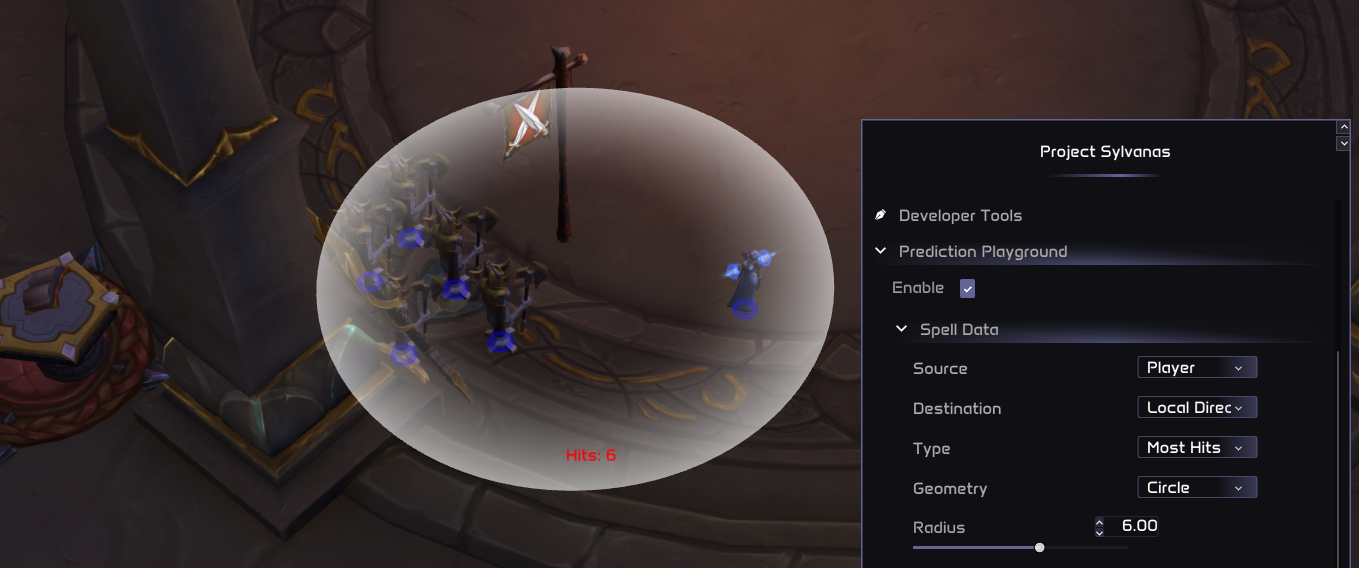
As you can see, we call prediction_type.MOST_HITS to fire Death and Decay on the Priest. Instead of casting on the center, it strategically places the spell slightly to the left to hit extra dummies aswell.
Test with the prediction_type.ACCURACY values for pinpointing situations where the cast should be avoided
Queue Fast Spell with Position 🎯
spell_queue:queue_spell_position_fast(spell_id: number, position: vec3, priority: number, message?: string)
- Queue a position-based spell that ignores the global cooldown.
The code would be exactly the same as the previous example, you just need to replace the queue spell function call
Best Practices 🧙♂️💡
1- Embrace the Spell Queue2- Remember the priority scale (1-9). Use it to create sophisticated casting logic.
Be cautious with priority levels! While 1 is the default,
higher priorities should be applied only when absolutely necessary.
1 is the default priority, intended for the majority of spells in the standard rotation. Developers should strive to keep spells at priority 1 unless a clear, specific reason justifies using a higher priority. This preserves rotation efficiency and prevents disruption.
Higher priorities are intended for spells that require urgent action outside the rotation. For example, interrupts use priority 7 to ensure they execute immediately when conditions demand it, as timing is crucial for effective interruption. Core utility spells, such as racials, dispels, or spell reflections, are typically set between 4 to 6. They preempt the rotation without overshadowing interrupts, allowing critical utilities to occur in time-sensitive situations.
Finally, priority 9 is exclusively reserved for manual player actions, ensuring that the player's chosen spell overrides any automated rotation or interrupt, with no delay.
In short, unless there is a compelling plan, stick with priority 1 for your spells. Use 2 only if you have a strong plan.
3- Fast Track Important Spells
Use _fast versions for critical, non-GCD spells.
4- Leave Breadcrumbs
Use the message parameter in spell_queue for easier debugging.
5- Learn to Use The Prediction Module
The spell_prediction module is powerful and easy to use library to evolve your logics.
Remember, mastering these tools takes practice. Experiment with different combinations and priorities to find what works best for your scripting needs.
More Raw Input Functions
Keyboard and Input State 🎹
is_key_pressed(key)
Checks if the specified key is currently being pressed.
Parameters:key(integer) — The virtual key code to check. See Virtual Key Codes.
Returns: boolean — true if the key is currently pressed; otherwise, false.
is_input_bit_active(bit_flag)
Checks if a specific input bit flag is currently active.
Parameters:bit_flag(number) — The input bit flag to check.
Returns: boolean — true if the input bit is active; otherwise, false.
Movement Controls 🎮
move_up_start()
Starts moving the player upwards (used in flying scenarios).
Returns: nil
move_up_stop()
Stops the upward movement.
Returns: nil
move_down_start()
Starts moving the player downwards (used in flying or swimming scenarios).
Returns: nil
move_down_stop()
Stops the downward movement.
Returns: nil
jump()
Makes the player jump.
Returns: nil
Expanded Movement Controls 🎮
move_forward_start()
Starts moving the player forward.
move_forward_stop()
Stops forward movement.
move_backward_start()
Starts moving the player backward.
move_backward_stop()
Stops backward movement.
turn_right_start()
Starts turning the player to the right.
turn_right_stop()
Stops turning to the right.
turn_left_start()
Starts turning the player to the left.
turn_left_stop()
Stops turning to the left.
strafe_right_start()
Starts strafing the player to the right.
strafe_right_stop()
Stops strafing to the right.
strafe_left_start()
Starts strafing the player to the left.
strafe_left_stop()
Stops strafing to the left.
Facing and Movement Lock 🧭
look_at(point)
Faces the local player towards a world position.
Parameters:point(vec3) — The world position to face towards.
Returns: nil
look_at_3d(point)
Faces the local player towards a world position, including vertical pitch adjustment.
Parameters:point(vec3) — The world position to face towards (includes vertical component).
Returns: nil
Unlike look_at which only adjusts horizontal facing, look_at_3d also adjusts the vertical pitch angle to look up or down at the target position.
set_pitch(radians)
Sets the player's vertical look angle (pitch).
Parameters:radians(number) — The pitch angle in radians.
Returns: nil
enable_movement()
Re-enables player movement after it has been disabled.
Returns: nil
disable_movement(is_lock)
Disables player movement. Useful for preventing movement during automated cast sequences.
Parameters:is_lock(boolean) — Whether to lock the movement state.
Returns: nil
Always make sure to call enable_movement() after you are done. Failing to re-enable movement will leave the player stuck!
Spell Cancellation 🚫
cancel_spells()
Cancels any spells currently being cast by the local player.
Returns: nil
stop_spell_target()
Stops the current spell targeting mode (e.g., cancels a pending skillshot cursor).
Returns: nil
cancel_buff(buff_otr)
Cancels (right-click removes) a specific buff from the local player.
Parameters:buff_otr(buff) — The buff object to cancel.
Returns: nil
Mounting and Dismounting 🐎
mount(mount_index)
Mounts a specific mount by its index.
Parameters:mount_index(integer) — The index of the mount to use.
Returns: nil
dismount()
Dismounts the player from their mount.
Returns: nil
Resurrection and Spirit Release 🎭
release_spirit()
Releases the player's spirit after death.
Returns: nil
resurrect_corpse()
Sends the player back to their corpse for resurrection.
Returns: nil
Combat 🗡️
stop_attack()
Stops all ongoing player attacks.
Returns: nil
Pet Control Functions 🐾
pet_move(target)
Commands the pet to move to the specified game object.
Parameters:target(game_object) — The game object to move the pet towards.
pet_move_position(position)
Moves the pet to a specified world position.
Parameters:position(vec3) — The world position to move the pet to.
pet_attack(target)
Commands the pet to attack the target.
Parameters:target(game_object) — The target to attack.
pet_cast_target_spell(spell_id, target)
Commands the pet to cast a spell on a target.
Parameters:spell_id(integer) — The ID of the spell to cast.target(game_object) — The target to cast the spell on.
pet_cast_position_spell(spell_id, position)
Commands the pet to cast a spell at a specific position.
Parameters:spell_id(integer) — The ID of the spell to cast.position(vec3) — The position to cast the spell at.
set_pet_passive()
Sets the pet to passive mode.
set_pet_defensive()
Sets the pet to defensive mode.
set_pet_aggressive()
Sets the pet to aggressive mode.
set_pet_assist()
Sets the pet to assist mode.
set_pet_wait()
Commands the pet to wait at its current position.
set_pet_follow()
Commands the pet to follow the player.
Loot and Object Interaction 🧹
loot_object(target)
Loots the specified game object.
Parameters:target(game_object) — The game object to loot.
loot_item(index)
Loots a specific item from the currently open loot window by its index.
Parameters:index(integer) — The index of the item in the loot window.
Returns: nil
close_loot()
Closes the currently open loot window.
Returns: nil
skin_object(target)
Skins a specified game object (e.g., a dead beast for leather).
Parameters:target(game_object) — The game object to skin.
Returns: nil
use_object(target)
Uses a specified game object (e.g., a quest object, a chest, a door).
Parameters:target(game_object) — The game object to use.
Returns: nil
interact_with_object(target)
Interacts with a specified game object. This is a general-purpose interaction function (e.g., talking to an NPC, opening a mailbox).
Parameters:target(game_object) — The game object to interact with.
Returns: nil
Battleground and Dungeon Finder ⚔️
accept_battlefield_port(index, is_accept)
Accepts or declines a battlefield (battleground) port invitation.
Parameters:index(number) — The battlefield port index.is_accept(boolean) —trueto accept,falseto decline.
Returns: nil
join_battlefield(battlefield_id, role_flags)
Queues the player for a specific battlefield.
Parameters:battlefield_id(number) — The ID of the battlefield to join.role_flags(number) — The role flags for the queue (e.g., tank, healer, damage).
Returns: nil
leave_battlefield()
Leaves the current battlefield.
Returns: nil
leave_party()
Leaves the current party or group.
Returns: nil
select_dungeon(category_id, dungeon_id)
Selects a dungeon in the dungeon finder interface.
Parameters:category_id(number) — The category ID of the dungeon type.dungeon_id(number) — The ID of the specific dungeon.
Returns: nil
join_dungeon(category_id, role_flags)
Queues the player for the selected dungeon(s).
Parameters:category_id(number) — The category ID of the dungeon type.role_flags(number) — The role flags for the queue.
Returns: nil
has_dungeon_proposal()
Checks if there is a pending dungeon proposal (ready check / group found popup).
Returns: nil
accept_dungeon_proposal(is_accept)
Accepts or declines a pending dungeon proposal.
Parameters:is_accept(boolean) —trueto accept,falseto decline.
Returns: nil
clear_dungeon_selections(index)
Clears dungeon selections in the dungeon finder interface.
Parameters:index(integer) — The index of the selection to clear.
Returns: nil
Pet Autocast 🐾
core.input.enable_pet_autocast
Syntax
core.input.enable_pet_autocast(spell_id: integer) -> nil
Parameters
spell_id:integer- The ID of the pet spell to enable autocast for.
Enables pet autocast for the specified spell.
Example Usage
core.input.enable_pet_autocast(89751)
core.input.disable_pet_autocast
Syntax
core.input.disable_pet_autocast(spell_id: integer) -> nil
Parameters
spell_id:integer- The ID of the pet spell to disable autocast for.
Disables pet autocast for the specified spell.
Example Usage
core.input.disable_pet_autocast(89751)
Misc Input Functions 🔧
core.input.quick_cat
Syntax
core.input.quick_cat() -> nil
Performs a quick interact/click action.
Example Usage
core.input.quick_cat()
core.input.clear_afk
Syntax
core.input.clear_afk() -> nil
Clears the AFK status of the local player.
Example Usage
core.input.clear_afk()