External Libraries
Overview
In this document, you will learn how the External Library system works in Project Sylvanas. We will cover three perspectives: how libraries behave for end users, how to create and publish your own library as a developer, and how to link and use existing libraries in your plugins and rotations.
What is a Library?
A library is a reusable code package that other developers can depend on. Libraries are not meant to offer features directly to end users — they exist to provide tools, utilities, or systems that plugins and rotations build upon.
Some examples of what a library could be:
- A UI helper library (e.g.
lx_ui) that makes building menus easier for developers. - A navigation library (e.g.
sentinel_nav) that lets plugins generate paths from A to B using navmesh. - A shared utility core (e.g.
byte_core) used across multiple plugins by the same developer to avoid repeating code.
If your script offers a feature directly to the end user — even something as simple as an anti-AFK — it should NOT be a library. It should be a plugin or a rotation. Libraries are invisible to users by design, and the system will automatically disable any loaded library that no plugin currently requires. If a user manually enables your library but nothing depends on it, the system will detect this and auto-disable it.
When Should You Make a Library?
Making a library is useful when:
- You want to reuse the same code across multiple plugins or rotations you develop.
- You want to share tools or utilities with other developers in the community.
- You want to offer a premium unlock layer for a freemium plugin (more on this below).
If none of these apply and your script is standalone, just make a plugin or rotation instead. You can always refactor later.
How Libraries Work for End Users
In the past, users had to manually manage library dependencies — finding them, enabling them, making sure the right versions were loaded. This was tedious and error-prone.
That's no longer the case. The library system is now fully automatic. When a user enables a plugin or rotation, the system resolves all of its library dependencies in the background and enables them automatically. When a plugin is disabled and no other plugin needs a given library, the system auto-disables it. Libraries are effectively invisible to end users.
Users can still see libraries in their dashboard if they want to, and they can manually enable or disable them. But there's generally no reason to — the system handles everything.
Manually enabling a library without any plugin that requires it is essentially pointless. The system will detect the orphaned library and auto-disable it on its next check.
Creating & Publishing a Library (Library Creator)
When you publish a script on the website and choose the Library type, a new set of Library Settings will be unlocked for you to configure.
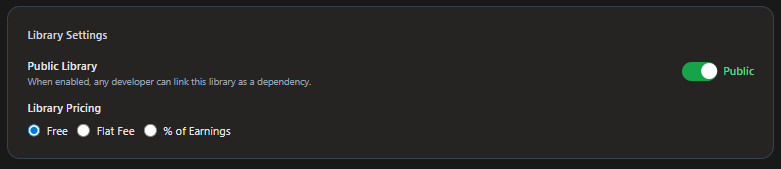
Visibility: Public vs Private
By default, when you create a library it is set to Private.
| Visibility | Who Can Link It | Use Case |
|---|---|---|
| Private | Only you (the creator) | Personal shared code across your own plugins |
| Public | Any developer on the platform | Community tools and utilities meant for everyone |
Private does not mean end users can't use it — the library will still be loaded automatically for any user running a plugin that depends on it. Private simply means that only you can link it to your own plugins and rotations. Other developers won't see it in the library search list and can't accidentally (or intentionally) link to it.
This is perfect for developers like Byte Core, Kebab, or Bald and Beautiful who maintain many plugins and rotations and use a shared internal library (often called "Core") to avoid repeating code. These libraries are designed for their own ecosystem — there's no public API and no reason for other developers to reference them.
If you do want other developers to be able to find and use your library, set it to Public. Only then will it appear in the library search for other developers to officially link.
Pricing
You have three pricing options for your library:
1. Free (Most Common)
The most common choice. Since library costs are indirect — users don't choose to "buy" a library, it comes bundled with whatever plugin they use — keeping libraries free avoids confusion and makes life easier for everyone.
2. Flat Price
A fixed cost for using the library. For example, 1,999 gold (≈ $1.99). Any plugin that depends on your library will require the user to have also purchased it.
3. Percentage-Based (Royalty)
Instead of a flat fee, you set a percentage of the earnings of whatever plugin depends on your library. For example, if you set a 10% royalty:
- A plugin that earns $100/month would owe your library $10/month.
- A free plugin earns $0, so any percentage of $0 is $0 — the developer pays nothing.
This model offers natural flexibility. If a developer uses your library but generates no revenue, neither do you. If they build a successful paid plugin on top of your library, you earn a fair royalty for your contribution.
The plugin developer who links your library can always see the royalty percentage before committing. If they feel the percentage isn't worth it, they're free to drop the dependency and implement their own solution — saving themselves the royalty.
Using a Library in Your Plugin (Plugin Developer)
If you want to use someone else's library (or your own) in a plugin or rotation, you need to link it as a dependency on the website.
How to Link a Library
- Go to your plugin edit page on the website.
- Scroll down past the screenshots section.
- You will find the Library Dependencies section (Max 20).
- Type the name of the library you want to link — the built-in search will show you all matching public libraries (and your own private libraries).
- Select the library to link it.
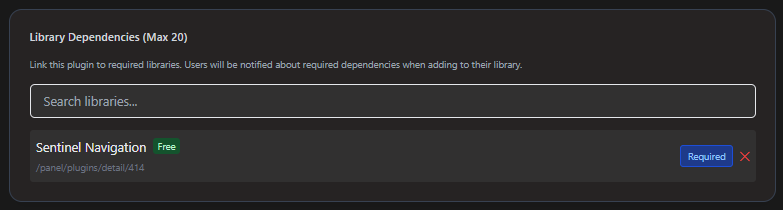
From there, you can also:
- Unlink a library you no longer need.
- Toggle between Mandatory and Optional mode.
Mandatory vs Optional
By default, linked libraries are set to Mandatory.
| Mode | Behavior |
|---|---|
| Mandatory | The library must be available for the plugin to work. The system will always load it automatically when the plugin is enabled. |
| Optional | The library is not required. The plugin works without it, but if the library is present and loaded, it can unlock extra functionality. |
For most use cases, Mandatory is what you want — your plugin depends on the library and can't function without it.
Optional exists for a specific and powerful pattern: the freemium model.
The Freemium Pattern
One of the most interesting uses of the library system is enabling a freemium plugin — a plugin that is free by default but can be upgraded to premium by the user.
Here's how it works:
- You create your plugin and publish it as free.
- You create a private library with a flat price (e.g., 1,000 gold ≈ $1/month).
- You link this library to your plugin as an Optional dependency.
- In your plugin code, you check whether the optional library is loaded:
- If not loaded → the user gets the free version with base features.
- If loaded → the user gets premium features unlocked.
The library effectively acts as a premium key that expands your free plugin into a premium one. The user decides if they want just the free experience or if they want to pay a small fee to unlock the extras.
You maintain a single plugin with a single codebase. No need to publish two separate versions of your script. The optional library dependency cleanly separates free from premium, and the user experience is seamless.
Quick Reference
| Role | What You Need to Know |
|---|---|
| End User | Libraries are automatic and invisible. You don't need to manage them — the system handles everything when you enable a plugin. |
| Library Creator | Publish as a Library type. Configure visibility (Private/Public) and pricing (Free/Flat/Royalty). Keep libraries as tools for developers, not features for users. |
| Plugin Developer | Link libraries in your plugin edit page under Library Dependencies. Choose Mandatory or Optional. Use Optional for freemium patterns. |
Libraries should contain reusable developer tools and utilities — not end-user features. If it's something a user would want to toggle on or off, it should be a plugin or rotation, not a library.