Nav Follower
Overview
Nav Follower is an open-source quality-of-life plugin that automatically walks your character to — and keeps following — another player using Nasrine's NavLib pathfinding. Think of it as a smarter /follow command: no distance limit, no getting stuck on geometry, and it keeps re-pathing as the target moves.
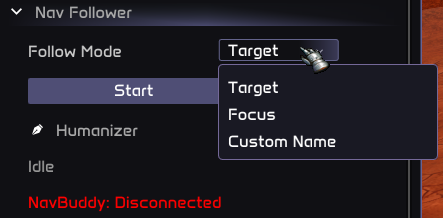
Pick from three follow modes in the menu, press Start, and go make a coffee while your character catches up to your friends.
Key Features:
- Three Follow Modes — follow your current target, your focus frame, or any player by name
- Adaptive Re-pathing — refreshes the path faster when close, slower when far away
- Pause & Resume — temporarily stop moving without losing your follow target
- No Distance Limit — unlike
/follow, works across entire zones - No Stuck Issues — navmesh pathing navigates around obstacles and terrain
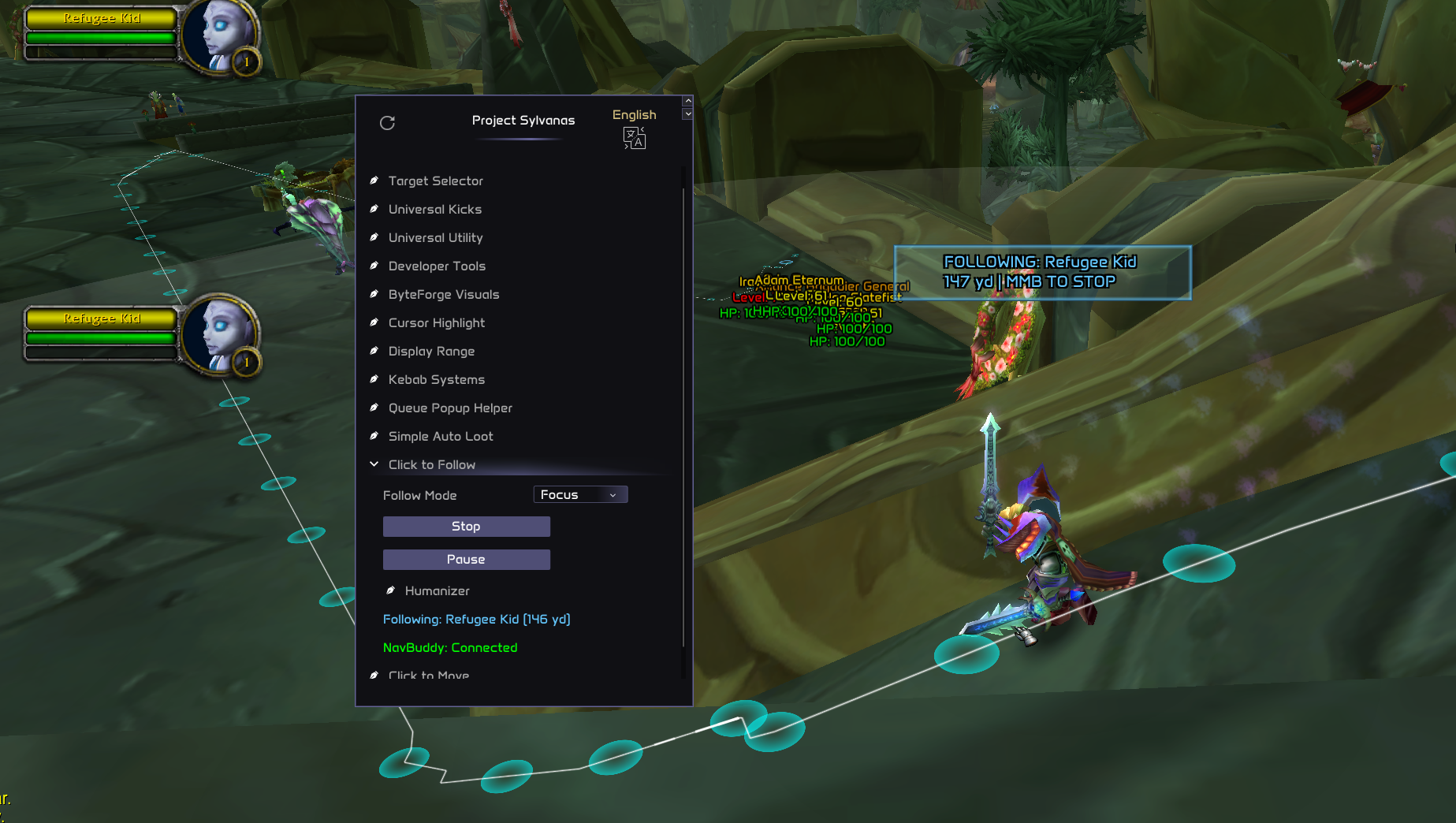
- Clean HUD — on-screen banner showing who you're following and how far away they are
Beyond the follow functionality, this plugin is a good reference for:
- Object Manager Scanning — finding players by name with a scan cooldown
- Adaptive Tick Rates — adjusting update frequency based on distance
- Menu System — comboboxes, text inputs, and dynamic button labels
- Continuous Pathing — re-issuing
move_toon a loop without stop/start jitter
How It Works
┌──────┐   menu Start   ┌──────────┐   target found   ┌─────────────┐
│ IDLE │ ────────────▶ │ SEARCHING │ ──────────────▶ │  FOLLOWING  │
└──────┘                └──────────┘                  └─────────────┘
   ▲                         ▲                               │
   │   menu Stop / MMB       │    target lost / died         │
   │◀─────────────────────── ◀──────────────────────────────┘
                             │                               │
                             │          menu Pause           │
                             │                        ┌──────▼──────┐
                             └────────────────────────│   PAUSED    │
                                    menu Resume       └─────────────┘
- Idle — choose a follow mode and target in the menu. Press Start.
- Searching — the plugin resolves who to follow based on your chosen mode. For custom names, it scans the object manager every 2 seconds.
- Following — once the target is found, the navmesh path is computed and your character walks. The path refreshes continuously as the target moves. When you get within 3 yards, movement pauses until the target moves away again.
- Paused — you can pause at any time. Your follow target is remembered so you can resume instantly.
Cancel at any time with Middle Mouse Button or the Stop button in the menu.
Full Source Code
-- Nav Follower: follow a target, focus, or named player via navmesh

local vec2  = require("common/geometry/vector_2")
local color = require("common/color")
local izi   = require("common/izi_sdk")
local plugin_helper = require("common/utility/plugin_helper")

local nav
local function get_nav()
    if nav then return nav end

    ---@diagnostic disable-next-line: undefined-field
    if not _G.NavLib then return nil end
    nav = _G.NavLib.create({
        movement = {
            waypoint_tolerance = 2.0,
            smoothing          = "chaikin",
            optimize           = true,
            allow_partial      = true,
            use_corridor_indoor = false,
        },
    })
    nav:on("stuck",  function() core.log_warning("[NavFollow] Stuck") end)
    nav:on("failed", function() core.log_error("[NavFollow] Path failed") end)
    return nav
end

local MODE_TARGET = 1
local MODE_FOCUS  = 2
local MODE_NAME   = 3

local menu = {
    tree       = core.menu.tree_node(),
    mode       = core.menu.combobox(1, "nav_follow_mode"),
    name_input = core.menu.text_input("nav_follow_name"),
    btn_start  = core.menu.button("nav_follow_start"),
    btn_stop   = core.menu.button("nav_follow_stop"),
    btn_pause  = core.menu.button("nav_follow_pause"),
}

local c_follow = color.new(100, 200, 255, 255)
local c_path   = color.cyan(150)
local c_ok     = color.green()
local c_warn   = color.new(255, 200, 0, 255)
local c_fail   = color.red()
local c_idle   = color.new(150, 150, 150, 255)

local active      = false
local paused      = false
local follow_obj  = nil
local last_path_t = 0
local last_scan_t = 0
local cached_name_obj = nil

local function me()     return core.object_manager.get_local_player() end
local function my_pos() local p = me(); return p and p:get_position() end

local function dist_to(obj)
    local m = my_pos()
    if not m or not obj then return 999 end
    return m:dist_to(obj:get_position())
end

-- Resolve follow target based on current mode
local function resolve_target()
    local mode = menu.mode:get()
    local now = core.time()

    if mode == MODE_TARGET then
        local p = me()
        return p and p:get_target()

    elseif mode == MODE_FOCUS then
        return core.input.get_focus()

    elseif mode == MODE_NAME then
        -- Reuse cached result for 2 seconds
        if cached_name_obj
            and cached_name_obj:is_valid()
            and not cached_name_obj:is_dead() then
            if now - last_scan_t < 2.0 then
                return cached_name_obj
            end
        end

        last_scan_t = now
        local wanted = menu.name_input:get_text()
        if not wanted or wanted == "" then return nil end

        local actors = core.object_manager.get_all_objects()
        for _, obj in ipairs(actors) do
            if obj:get_name() == wanted and not obj:is_dead() then
                cached_name_obj = obj
                return obj
            end
        end
        cached_name_obj = nil
        return nil
    end

    return nil
end

local function start_follow()
    if not get_nav() then return end
    active, paused = true, false
    follow_obj = nil
    last_path_t = 0
    core.log("[NavFollow] Started")
end

local function stop_follow()
    local n = get_nav()
    if n then n:stop() end
    active, paused = false, false
    follow_obj = nil
    cached_name_obj = nil
    core.log("[NavFollow] Stopped")
end

local function pause_follow()
    if not active then return end
    paused = not paused
    if paused then
        local n = get_nav()
        if n then n:stop() end
    end
    core.log("[NavFollow] " .. (paused and "Paused" or "Resumed"))
end

-- Input: middle mouse button stops following
izi.on_key_release(0x04, function()
    if active then stop_follow() end
end)

-- Update: resolve target, manage pathing
core.register_on_update_callback(function()
    local n = get_nav()
    if not n then return end
    n:update()
    if not active or paused then return end

    local p = me()
    if not p or p:is_dead() or p:is_ghost() then return end

    local target = resolve_target()
    if not target or not target:is_valid() or target:is_dead() then
        follow_obj = nil
        return
    end

    follow_obj = target
    local d = dist_to(target)
    local now = core.time()

    -- Adaptive interval: close = fast refresh, far = slow refresh
    local interval = d < 30 and 0.2 or 1.0

    -- Close enough, stop moving
    if d < 3.0 then
        n:stop()
        last_path_t = now
        return
    end

    if now - last_path_t < interval then return end
    last_path_t = now

    local target_pos = target:get_position()
    n:move_to(target_pos, function(ok, reason)
        if not ok then
            core.log_warning("[NavFollow] Path failed: " .. tostring(reason))
        end
    end)
end)

-- Render: draw path, target marker, HUD banner
core.register_on_render_callback(function()
    local p = me()
    if not p or p:is_dead() or p:is_ghost() then return end
    if not active then return end

    local n = get_nav()

    -- Draw circle around follow target
    if follow_obj and follow_obj:is_valid() then
        local tpos = follow_obj:get_position()
        core.graphics.circle_3d(tpos, 1.0, c_follow, 2.0, 2.0)
    end

    -- Draw navmesh path
    if n then
        local path = n:get_current_path()
        if path and #path > 0 then
            for i = 1, #path do
                if i % 12 == 1 or i == #path then
                    core.graphics.circle_3d(path[i], 0.5, c_path, 10, 1.5)
                end
                if i < #path then
                    core.graphics.line_3d(
                        path[i], path[i + 1],
                        color.white(100), 2, 1.5, true
                    )
                end
            end
        end
    end

    -- HUD banner
    local scr = core.graphics.get_screen_size()
    local cx = scr.x * 0.5
    local cy = scr.y * 0.25

    local name = follow_obj
        and follow_obj:is_valid()
        and follow_obj:get_name()
        or "Searching..."
    local d_str = follow_obj
        and string.format("%.0f yd", dist_to(follow_obj))
        or "?"
    local status = paused
        and "FOLLOW: PAUSED"
        or "FOLLOWING: " .. name
    local banner_text = status .. " \n" .. d_str .. " | MMB TO STOP"
    local bc = paused and c_warn or c_follow

    local tw = core.graphics.get_text_width(banner_text, 9, 3)

    plugin_helper:draw_text_message(
        banner_text, bc, color.new(0, 0, 0, 150),
        vec2.new(cx - tw, cy), vec2.new(200, 36),
        false, true, "nav_fol_banner", nil, true, 3
    )
end)

-- Menu: mode selection, controls, status
core.register_on_render_menu_callback(function()
    menu.tree:render("Nav Follower", function()
        menu.mode:render("Follow Mode", { "Target", "Focus", "Custom Name" })

        if menu.mode:get() == MODE_NAME then
            menu.name_input:render("Player Name")
        end

        if not active then
            if menu.btn_start:render("Start") then start_follow() end
        else
            if menu.btn_stop:render("Stop") then stop_follow() end
            if menu.btn_pause:render(paused and "Resume" or "Pause") then
                pause_follow()
            end
        end

        -- Status display
        if active then
            local name = follow_obj
                and follow_obj:is_valid()
                and follow_obj:get_name()
                or "---"
            local d = follow_obj
                and string.format("%.0f yd", dist_to(follow_obj))
                or "?"
            core.menu.header():render(
                string.format("%s: %s (%s)",
                    paused and "Paused" or "Following", name, d),
                paused and c_warn or c_follow
            )
        else
            core.menu.header():render("Idle", c_idle)
        end

        -- NavBuddy connection status
        local n = get_nav()
        if n then
            local ok = n:is_server_available()
            core.menu.header():render(
                "NavBuddy: " .. (ok and "Connected" or "Disconnected"),
                ok and c_ok or c_fail
            )
        else
            core.menu.header():render("NavLib: not loaded", c_fail)
        end
    end)
end)
Code Walkthrough
Dependencies
local vec2  = require("common/geometry/vector_2")
local color = require("common/color")
local izi   = require("common/izi_sdk")
local plugin_helper = require("common/utility/plugin_helper")
Same foundation as the NavMesh Playground: izi for input callbacks, vec2 for screen positions, color for rendering, and plugin_helper for the HUD banner.
NavLib Setup
local nav
local function get_nav()
    if nav then return nav end
    if not _G.NavLib then return nil end

    nav = _G.NavLib.create({
        movement = {
            waypoint_tolerance = 2.0,
            smoothing          = "chaikin",
            optimize           = true,
            allow_partial      = true,
            use_corridor_indoor = false,
        },
    })
    nav:on("stuck",  function() core.log_warning("[NavFollow] Stuck") end)
    nav:on("failed", function() core.log_error("[NavFollow] Path failed") end)
    return nav
end
The same lazy-init pattern from the Playground example. The waypoint_tolerance is slightly tighter at 2.0 yards since we want smoother following behavior when walking near the target. Notice that arrived isn't registered here — the follower never truly "arrives" because it continuously re-paths to a moving target.
Follow Modes
The plugin defines three ways to pick who to follow:
local MODE_TARGET = 1
local MODE_FOCUS  = 2
local MODE_NAME   = 3
| Mode | How It Works | Best For |
|---|---|---|
| Target | Follows whoever you have selected (get_target()) | Quick follow — click someone, press Start |
| Focus | Follows your focus frame (get_focus()) | Persistent follow — focus doesn't change when you click around |
| Custom Name | Scans the object manager for an exact name match | Following a specific friend, even if you can't target them |
Target Resolution
local function resolve_target()
    local mode = menu.mode:get()
    local now = core.time()

    if mode == MODE_TARGET then
        local p = me()
        return p and p:get_target()

    elseif mode == MODE_FOCUS then
        return core.input.get_focus()

    elseif mode == MODE_NAME then
        -- Reuse cached result for 2 seconds
        if cached_name_obj
            and cached_name_obj:is_valid()
            and not cached_name_obj:is_dead() then
            if now - last_scan_t < 2.0 then
                return cached_name_obj
            end
        end

        last_scan_t = now
        local wanted = menu.name_input:get_text()
        if not wanted or wanted == "" then return nil end

        local actors = core.object_manager.get_all_objects()
        for _, obj in ipairs(actors) do
            if obj:get_name() == wanted and not obj:is_dead() then
                cached_name_obj = obj
                return obj
            end
        end
        cached_name_obj = nil
        return nil
    end

    return nil
end
This function is called every update tick, so performance matters. The Target and Focus modes are trivial — they return a single game object directly from the API.
The Custom Name mode is more interesting. It needs to scan the entire object manager to find a player by name, which is expensive. The plugin solves this with a scan cooldown pattern:
- If the cached object is still valid, reuse it for 2 seconds without scanning.
- After the cooldown, do a fresh scan and update the cache.
- If the player disappears (leaves range, phases out), the cache clears and scanning resumes.
This cached-with-timeout approach is reusable any time you need to find objects by name, NPC ID, or other criteria that requires iterating the object manager. A 1–2 second cooldown is usually unnoticeable to the user but dramatically reduces CPU overhead.
Adaptive Re-pathing
The core follow loop lives in on_update:
follow_obj = target
local d = dist_to(target)
local now = core.time()

-- Adaptive interval: close = fast refresh, far = slow refresh
local interval = d < 30 and 0.2 or 1.0

-- Close enough, stop moving
if d < 3.0 then
    n:stop()
    last_path_t = now
    return
end

if now - last_path_t < interval then return end
last_path_t = now

local target_pos = target:get_position()
n:move_to(target_pos, function(ok, reason)
    if not ok then
        core.log_warning("[NavFollow] Path failed: " .. tostring(reason))
    end
end)
This is where the "smarter /follow" magic happens. Three key behaviors:
1. Distance-based refresh rate:
| Distance | Refresh Interval | Why |
|---|---|---|
| < 30 yards | 200ms | Close to target — need to track small movements accurately |
| ≥ 30 yards | 1000ms | Far away — target position changes are relatively small, save CPU |
2. Dead zone at 3 yards:
When you're within 3 yards, the plugin calls n:stop() and waits. This prevents the jittery "orbiting" that happens when you try to path to a point you're already standing on. As soon as the target walks away, pathing resumes naturally.
3. Fire-and-forget move_to:
Unlike the Playground example (which uses the callback to show notifications), the follower's callback only logs failures. It doesn't set traveling = false or clear state — the next tick will just issue a fresh move_to regardless. This continuous overwrite approach is simpler than tracking arrival for a moving target.
Pause & Resume
local function pause_follow()
    if not active then return end
    paused = not paused
    if paused then
        local n = get_nav()
        if n then n:stop() end
    end
    core.log("[NavFollow] " .. (paused and "Paused" or "Resumed"))
end
Pausing is a toggle. When paused, n:stop() halts movement immediately, and the update loop's early return (if not active or paused then return end) prevents any new paths from being requested. The follow target is preserved, so resuming picks up right where you left off.
The pause button label dynamically changes between "Pause" and "Resume":
if menu.btn_pause:render(paused and "Resume" or "Pause") then
    pause_follow()
end
This is a clean pattern for toggle buttons in the menu system.
Menu System
menu.tree:render("Nav Follower", function()
    menu.mode:render("Follow Mode", { "Target", "Focus", "Custom Name" })

    if menu.mode:get() == MODE_NAME then
        menu.name_input:render("Player Name")
    end

    if not active then
        if menu.btn_start:render("Start") then start_follow() end
    else
        if menu.btn_stop:render("Stop") then stop_follow() end
        if menu.btn_pause:render(paused and "Resume" or "Pause") then
            pause_follow()
        end
    end
end)
The menu demonstrates several useful patterns:
- Combobox (
core.menu.combobox) — a dropdown for selecting the follow mode. - Conditional rendering — the text input for player name only appears when Custom Name mode is selected. This keeps the UI clean by hiding irrelevant controls.
- Dynamic buttons — different buttons appear based on state (Start when idle, Stop/Pause when active). The Pause button toggles its own label.
- Color-coded status — blue for following, yellow for paused, grey for idle, red for errors.
HUD Banner
local name = follow_obj
    and follow_obj:is_valid()
    and follow_obj:get_name()
    or "Searching..."
local d_str = follow_obj
    and string.format("%.0f yd", dist_to(follow_obj))
    or "?"
local status = paused
    and "FOLLOW: PAUSED"
    or "FOLLOWING: " .. name
local banner_text = status .. " \n" .. d_str .. " | MMB TO STOP"
The banner shows three pieces of information at a glance: the current state, who you're following (or "Searching..." if the target hasn't been resolved yet), and the distance. The color changes between blue (active) and yellow (paused) for instant visual feedback.
Controls
| Input | Context | Action |
|---|---|---|
| Menu → Start | Idle | Begin following |
| Menu → Stop | Active | Stop following |
| Menu → Pause/Resume | Active | Toggle pause |
| Middle Mouse Button | Active | Stop following |
Comparison with /follow
| Feature | /follow | Nav Follower |
|---|---|---|
| Distance limit | ~30 yards, breaks beyond that | Unlimited — works across entire zones |
| Obstacle handling | Walks into walls, gets stuck | Navmesh pathing around geometry |
| Target lost | Stops permanently | Keeps searching, auto-resumes |
| Pause/Resume | Not supported | Built-in toggle |
| Follow by name | Not supported | Type any player name |
| Follow focus | Not supported | Dedicated focus mode |
| Works while AFK | Breaks easily | Robust continuous re-pathing |
Key Patterns to Reuse
| Pattern | Where in Code | Reuse For |
|---|---|---|
| Object Manager scan with cooldown | resolve_target() NAME mode | Finding any entity by name/NPC ID efficiently |
| Adaptive tick rate | interval = d < 30 and 0.2 or 1.0 | Any distance-dependent update frequency |
| Continuous re-pathing | move_to in update loop, ignore callback | Following moving targets, escort logic |
| Dead zone | if d < 3.0 then n:stop() | Preventing jitter when at destination |
| Conditional menu controls | if mode == MODE_NAME then show input | Context-sensitive UI that hides irrelevant options |
| Toggle button label | paused and "Resume" or "Pause" | Any on/off toggle in menu system |
| Lazy module init | get_nav() with cached instance | Optional dependencies that may not be loaded |
Requirements
- Nasrine's NavLib — The navmesh pathfinding library must be loaded (
_G.NavLibmust exist)