Map Click to Nav
Overview
Map Click to Nav is a lightweight open-source example that demonstrates how to build a click-to-walk system using the Nasrine's NavLib pathfinding library. Open your in-game map, click anywhere, confirm via a notification popup, and your character automatically walks there along a navmesh path.
Beyond pathfinding, this plugin is also a great reference for several common patterns you'll reuse in your own projects:
- Notification System — push confirmations, detect clicks, handle expiry
- Map Click Detection — convert 2D map cursor position to 3D world coordinates
- 3D Path Rendering — draw circles, lines, and text in the game world
- Input Handling — react to key releases with guard checks (menu open, notification hover, etc.)
- State Machine — clean idle → pending → traveling flow with cancellation
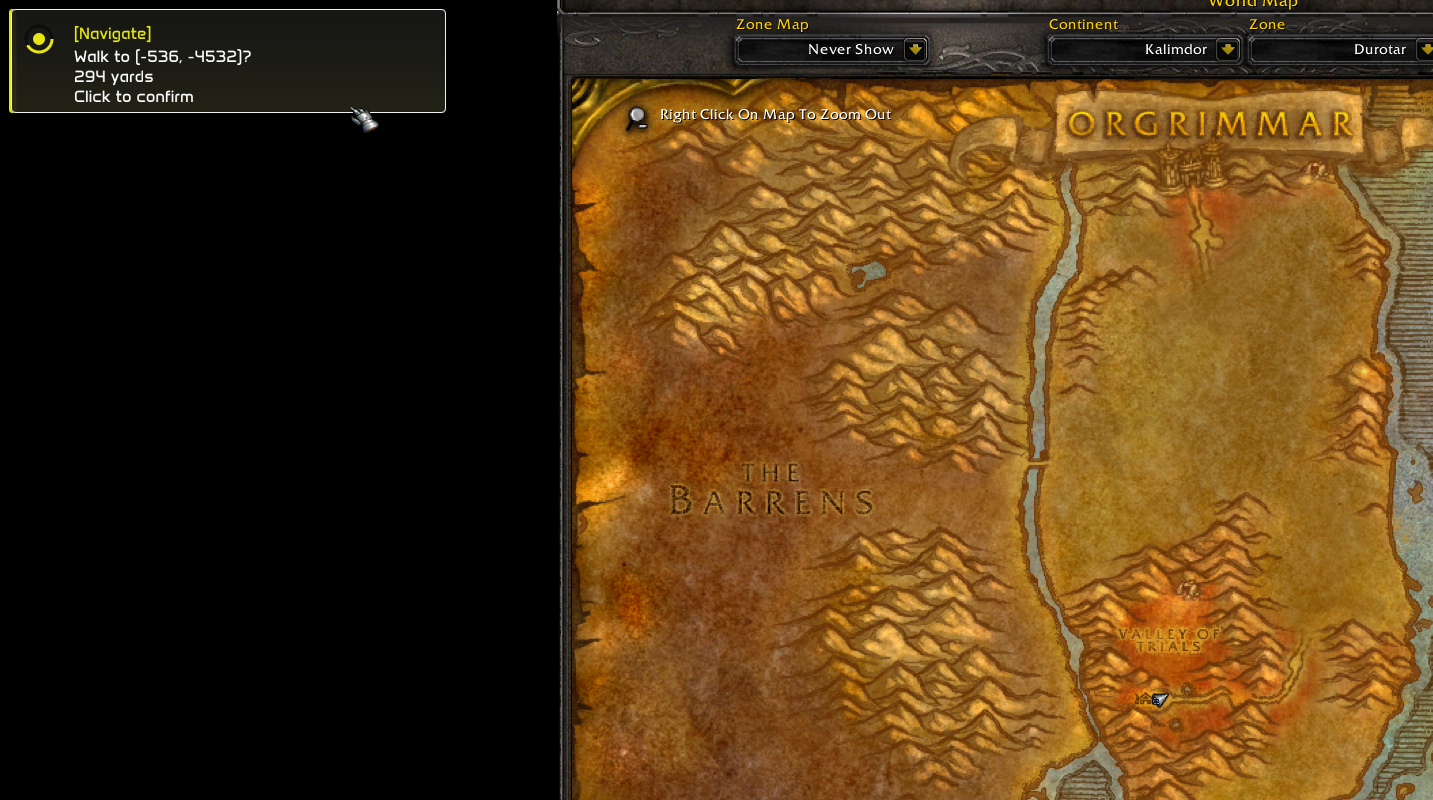
How It Works
The plugin follows a simple three-state flow:
┌──────┐   map click    ┌─────────┐   click notif   ┌────────────┐
│ IDLE │ ────────────▶ │ PENDING  │ ────────────▶  │  TRAVELING │
└──────┘                └─────────┘                 └────────────┘
   ▲                        │                              │
   │    notif expires       │      MMB or arrival          │
   │◀───────────────────────┘◀────────────────────────────┘
- Idle — waiting for input. Open the map and left-click a destination.
- Pending — a notification appears showing the destination and distance. Click it to confirm, or press Middle Mouse Button (MMB) to cancel. If the notification expires, the request is silently dropped.
- Traveling — the navmesh path is computed and your character walks along it. A banner displays progress. Press MMB at any time to stop.
Full Source Code
-- Nav Playground: click map → confirm notification → navmesh walk, MMB cancel

local vec2  = require("common/geometry/vector_2")
local color = require("common/color")
local izi   = require("common/izi_sdk")
local plugin_helper = require("common/utility/plugin_helper")

local nav
local function get_nav()
    if nav then return nav end

    ---@diagnostic disable-next-line: undefined-field
    if not _G.NavLib then return nil end
    nav = _G.NavLib.create({
        movement = {
            waypoint_tolerance = 3.0,
            smoothing          = "chaikin",
            optimize           = true,
            allow_partial      = true,
            use_corridor_indoor = false,
        },
    })
    nav:on("arrived", function() core.log("[Nav] Arrived") end)
    nav:on("stuck",   function() core.log_warning("[Nav] Stuck") end)
    nav:on("failed",  function() core.log_error("[Nav] Failed") end)
    return nav
end

local NOTIF_ID     = "nav_pg_confirm"
local CONFIRM_TIME = 4.0

local pending, destination, traveling = nil, nil, false
local confirm_t, needs_notif = 0, false

local menu = {
    tree   = core.menu.tree_node(),
    stop   = core.menu.button("nav_pg_stop"),
    cancel = core.menu.button("nav_pg_cancel"),
}

local c_pending = color.new(255, 200, 0, 255)
local c_path    = color.cyan(150)
local c_dest    = color.green()
local c_active  = color.new(0, 255, 100, 255)
local c_fail    = color.red()
local c_idle    = color.new(150, 150, 150, 255)

local function me()     return core.object_manager.get_local_player() end
local function my_pos() local p = me(); return p and p:get_position() end
local function dist(p)  local m = my_pos(); return m and m:dist_to(p) or 0 end
local function fmt(p)   return string.format("%.0f, %.0f, %.0f", p.x, p.y, p.z) end

local function cursor_in_menu()
    if not core.graphics.is_menu_open() then return false end
    local c = core.get_cursor_position()
    local p = core.graphics.get_main_menu_screen_pos()
    local s = core.graphics.get_main_menu_screen_size()
    if not c or not p or not s then return false end
    return c.x >= p.x and c.x <= p.x + s.x
       and c.y >= p.y and c.y <= p.y + s.y
end

local function cursor_in_notification()
    if not pending then return false end
    local c = core.get_cursor_position()
    local layout = core.graphics.get_notifications_layout()
    if not c or not layout then return false end

    local px, py = layout.base_pos.x, layout.base_pos.y
    local sw = layout.default_size.x * 1.2
    local sh = layout.default_size.y + 36
    local step = math.max(layout.separation, sh + 10)

    for slot = 0, 4 do
        local sy = py + step * slot
        if c.x >= px and c.x <= px + sw
           and c.y >= sy and c.y <= sy + sh then
            return true
        end
    end
    return false
end

local function start()
    local n = get_nav()
    if not n or not pending then return end
    destination, pending, needs_notif = pending, nil, false
    confirm_t = core.time()

    n:move_to(destination, function(ok, reason)
        if ok then
            core.graphics.add_notification(
                "nav_pg_ok", "[Nav]", "Arrived!", 3.0, c_dest
            )
        else
            core.graphics.add_notification(
                "nav_pg_err", "[Nav]",
                "Failed:\n" .. tostring(reason), 4.0, c_fail
            )
        end
        traveling, destination = false, nil
    end)
    traveling = true
end

local function stop()
    local n = get_nav()
    if n then n:stop() end
    traveling, destination, pending, needs_notif = false, nil, nil, false
end

-- Input: left click on map sets pending destination
izi.on_key_release(0x01, function()
    if not core.game_ui.is_map_open() then return end
    if core.time() - confirm_t < 0.5 then return end
    if cursor_in_menu() or cursor_in_notification() then return end

    local pos = izi.get_cursor_world_pos()
    if not pos then return end
    if traveling then stop() end
    pending, needs_notif = pos, true
end)

-- Input: middle mouse button cancels
izi.on_key_release(0x04, function()
    if traveling then
        stop()
    elseif pending then
        pending, needs_notif = nil, false
    end
end)

-- Update: push notification and handle confirmation
core.register_on_update_callback(function()
    local n = get_nav()
    if n then n:update() end
    if not pending then return end

    if needs_notif then
        needs_notif = false
        local msg = string.format(
            "Walk to (%.0f, %.0f)?\n%.0f yards\nClick to confirm",
            pending.x, pending.y, dist(pending)
        )
        core.graphics.add_notification(
            NOTIF_ID, "[Navigate]", msg, CONFIRM_TIME, c_pending
        )
        return
    end

    if core.graphics.is_notification_clicked(NOTIF_ID, 0.5) then
        start()
        return
    end

    if not core.graphics.is_notification_active(NOTIF_ID) then
        pending = nil
    end
end)

-- Render: draw 3D path, destination markers, HUD text
core.register_on_render_callback(function()
    local p = me()
    if not p or p:is_dead() or p:is_ghost() then return end
    local pos = p:get_position()
    local n = get_nav()

    -- Pending state: show destination preview
    if pending then
        core.graphics.circle_3d(pending, 1.5, c_pending, 3.0, 2.5)
        core.graphics.line_3d(pos, pending, c_pending, 2, 1.5, true)
        core.graphics.text_2d(
            string.format(
                "Pending: %.0f yd | Click notif | MMB cancel",
                dist(pending)
            ),
            vec2.new(20, 20), 16, c_pending, false
        )
        return
    end

    -- Traveling state: draw path and progress HUD
    if destination then
        core.graphics.circle_3d(destination, 1.5, c_dest, 3.0, 2.5)
    end

    if traveling and n then
        local path = n:get_current_path()
        if path and #path > 0 then
            for i = 1, #path do
                if i % 12 == 1 or i == #path then
                    core.graphics.circle_3d(path[i], 0.5, c_path, 10, 1.5)
                end
                if i < #path then
                    core.graphics.line_3d(
                        path[i], path[i + 1],
                        color.white(100), 2, 1.5, true
                    )
                end
            end
        end

        local pr = n:get_progress()
        core.graphics.text_2d(
            string.format(
                "Moving | %s | WP %d/%d | %.0fm | MMB stop",
                pr.state or "?",
                pr.path_index or 0,
                pr.path_count or 0,
                pr.distance_remaining or 0
            ),
            vec2.new(20, 20), 16, color.cyan(), false
        )

        local scr = core.graphics.get_screen_size()
        local cx = scr.x * 0.5
        local cy = scr.y * 0.25

        local top_text = "AUTO-WALK: ON \nMMB TO CANCEL"
        local banner_w, banner_h = 200, 36
        local top_tw = core.graphics.get_text_width(top_text, 9, 3)

        plugin_helper:draw_text_message(
            top_text, c_pending, color.new(0, 0, 0, 150),
            vec2.new(cx - top_tw, cy), vec2.new(banner_w, banner_h),
            false, true, "nav_pg_banner_top", nil, true, 3
        )
    end
end)

-- Menu: status display and manual controls
core.register_on_render_menu_callback(function()
    menu.tree:render("Nav Playground", function()
        if traveling then
            local pr = get_nav() and get_nav():get_progress()
            if pr then
                core.menu.header():render(
                    string.format("Moving: %s | WP %d/%d",
                        pr.state or "?",
                        pr.path_index or 0,
                        pr.path_count or 0),
                    c_active
                )
            end
        elseif pending then
            core.menu.header():render(
                string.format("Pending: %.0f, %.0f", pending.x, pending.y),
                c_pending
            )
        else
            core.menu.header():render(
                "Idle - click map to set destination", c_idle
            )
        end

        if traveling and menu.stop:render("Stop") then stop() end
        if (pending or traveling) and menu.cancel:render("Cancel") then
            stop()
        end

        local n = get_nav()
        if n then
            local ok = n:is_server_available()
            core.menu.header():render(
                "NavBuddy: " .. (ok and "Connected" or "Disconnected"),
                ok and c_dest or c_fail
            )
        else
            core.menu.header():render("NavLib: not loaded", c_fail)
        end
    end)
end)
Code Walkthrough
Dependencies
local vec2  = require("common/geometry/vector_2")
local color = require("common/color")
local izi   = require("common/izi_sdk")
local plugin_helper = require("common/utility/plugin_helper")
The plugin uses izi for input callbacks and map helpers, vec2 for screen positions, color for rendering, and plugin_helper for the HUD banner.
NavLib Setup
local nav
local function get_nav()
    if nav then return nav end
    if not _G.NavLib then return nil end

    nav = _G.NavLib.create({
        movement = {
            waypoint_tolerance = 3.0,
            smoothing          = "chaikin",
            optimize           = true,
            allow_partial      = true,
            use_corridor_indoor = false,
        },
    })

    nav:on("arrived", function() core.log("[Nav] Arrived") end)
    nav:on("stuck",   function() core.log_warning("[Nav] Stuck") end)
    nav:on("failed",  function() core.log_error("[Nav] Failed") end)
    return nav
end
NavLib is created lazily on first use. The create call accepts a configuration table where you can tune movement behavior:
| Option | Description |
|---|---|
waypoint_tolerance | How close (yards) to a waypoint before moving to the next one |
smoothing | Path smoothing algorithm ("chaikin" produces nice curves) |
optimize | Remove redundant waypoints from the path |
allow_partial | If the full path can't be computed, use as much as possible |
use_corridor_indoor | Whether to use corridor-based movement indoors |
Three event callbacks are registered for logging. In a real plugin you might use these to trigger UI updates or retry logic.
State Management
The plugin uses three simple variables to track its state:
local pending, destination, traveling = nil, nil, false
| Variable | Type | Meaning |
|---|---|---|
pending | vec3|nil | A destination the user clicked but hasn't confirmed yet |
destination | vec3|nil | The confirmed destination we're actively walking to |
traveling | boolean | Whether navmesh movement is in progress |
The stop() function cleanly resets everything:
local function stop()
    local n = get_nav()
    if n then n:stop() end
    traveling, destination, pending, needs_notif = false, nil, nil, false
end
Map Click → World Position
izi.on_key_release(0x01, function()
    if not core.game_ui.is_map_open() then return end
    if core.time() - confirm_t < 0.5 then return end
    if cursor_in_menu() or cursor_in_notification() then return end

    local pos = izi.get_cursor_world_pos()
    if not pos then return end
    if traveling then stop() end
    pending, needs_notif = pos, true
end)
This demonstrates a common pattern: respond to left-click (0x01) only when the map is open, with several guard checks:
- Map open? — Only respond to clicks on the 2D map, not the 3D world.
- Cooldown — A 0.5s cooldown after confirming prevents the confirmation click from immediately setting a new destination.
- Cursor guards — Don't fire if the cursor is over the settings menu or a notification popup.
izi.get_cursor_world_pos()— Converts the 2D map cursor position into 3D world coordinates. This is the key IZI helper that makes map clicking work.
Notification Confirmation Flow
This plugin is also a great reference for how to use the notification system as an interactive confirmation dialog.
Pushing a notification:
if needs_notif then
    needs_notif = false
    local msg = string.format(
        "Walk to (%.0f, %.0f)?\n%.0f yards\nClick to confirm",
        pending.x, pending.y, dist(pending)
    )
    core.graphics.add_notification(
        NOTIF_ID, "[Navigate]", msg, CONFIRM_TIME, c_pending
    )
    return
end
add_notification takes a unique ID, title, body text, display duration, and accent color. The ID is important because it's how you track clicks and check if the notification is still visible.
Detecting a click on the notification:
if core.graphics.is_notification_clicked(NOTIF_ID, 0.5) then
    start()
    return
end
The second argument (0.5) is a grace period in seconds — if the notification was clicked within the last 0.5s, this returns true.
Handling expiry:
if not core.graphics.is_notification_active(NOTIF_ID) then
    pending = nil
end
If the notification expires without being clicked, the pending destination is silently cleared.
This push → detect click → handle expiry pattern is reusable for any confirmation dialog: teleport confirmations, item usage prompts, dangerous action warnings, etc.
Cursor Guard Checks
A subtle but important detail — when the user clicks the notification to confirm, that same click event also fires the on_key_release(0x01) handler. Without guards, confirming a walk would immediately set a new pending destination.
The plugin solves this with two bounds checks:
local function cursor_in_menu()
    if not core.graphics.is_menu_open() then return false end
    local c = core.get_cursor_position()
    local p = core.graphics.get_main_menu_screen_pos()
    local s = core.graphics.get_main_menu_screen_size()
    if not c or not p or not s then return false end
    return c.x >= p.x and c.x <= p.x + s.x
       and c.y >= p.y and c.y <= p.y + s.y
end

local function cursor_in_notification()
    if not pending then return false end
    local c = core.get_cursor_position()
    local layout = core.graphics.get_notifications_layout()
    if not c or not layout then return false end

    local px, py = layout.base_pos.x, layout.base_pos.y
    local sw = layout.default_size.x * 1.2
    local sh = layout.default_size.y + 36
    local step = math.max(layout.separation, sh + 10)

    for slot = 0, 4 do
        local sy = py + step * slot
        if c.x >= px and c.x <= px + sw
           and c.y >= sy and c.y <= sy + sh then
            return true
        end
    end
    return false
end
The notification check iterates over the possible notification slots and tests whether the cursor falls within any of them. This is a practical technique you can reuse whenever you need to prevent click-through on overlapping UI elements.
Starting Navigation
local function start()
    local n = get_nav()
    if not n or not pending then return end
    destination, pending, needs_notif = pending, nil, false
    confirm_t = core.time()

    n:move_to(destination, function(ok, reason)
        if ok then
            core.graphics.add_notification(
                "nav_pg_ok", "[Nav]", "Arrived!", 3.0, c_dest
            )
        else
            core.graphics.add_notification(
                "nav_pg_err", "[Nav]",
                "Failed:\n" .. tostring(reason), 4.0, c_fail
            )
        end
        traveling, destination = false, nil
    end)
    traveling = true
end
move_to is the core NavLib function. It takes a target vec3 and a completion callback. The callback receives ok (boolean) and reason (string on failure). The plugin uses this to show success/failure notifications.
Note that confirm_t is set here — this timestamp powers the 0.5s cooldown in the click handler to prevent the confirmation click from double-firing.
3D Path Rendering
if traveling and n then
    local path = n:get_current_path()
    if path and #path > 0 then
        for i = 1, #path do
            if i % 12 == 1 or i == #path then
                core.graphics.circle_3d(path[i], 0.5, c_path, 10, 1.5)
            end
            if i < #path then
                core.graphics.line_3d(
                    path[i], path[i + 1],
                    color.white(100), 2, 1.5, true
                )
            end
        end
    end
end
get_current_path() returns the array of vec3 waypoints. The rendering loop draws:
- Lines between consecutive waypoints (white, semi-transparent)
- Circles at every 12th waypoint (cyan) to mark progress without visual clutter
- A circle at the final waypoint so the destination is always visible
This is a clean pattern for visualizing any path — navmesh routes, patrol routes, spell trajectories, etc.
Menu Integration
core.register_on_render_menu_callback(function()
    menu.tree:render("Nav Playground", function()
        if traveling then
            local pr = get_nav() and get_nav():get_progress()
            if pr then
                core.menu.header():render(
                    string.format("Moving: %s | WP %d/%d",
                        pr.state or "?",
                        pr.path_index or 0,
                        pr.path_count or 0),
                    c_active
                )
            end
        elseif pending then
            core.menu.header():render(
                string.format("Pending: %.0f, %.0f", pending.x, pending.y),
                c_pending
            )
        else
            core.menu.header():render(
                "Idle - click map to set destination", c_idle
            )
        end

        if traveling and menu.stop:render("Stop") then stop() end
        if (pending or traveling) and menu.cancel:render("Cancel") then
            stop()
        end

        -- NavBuddy connection status
        local n = get_nav()
        if n then
            local ok = n:is_server_available()
            core.menu.header():render(
                "NavBuddy: " .. (ok and "Connected" or "Disconnected"),
                ok and c_dest or c_fail
            )
        else
            core.menu.header():render("NavLib: not loaded", c_fail)
        end
    end)
end)
The menu provides a status overview and manual Stop/Cancel buttons. The color-coded headers give quick visual feedback: green for active movement, yellow for pending, grey for idle, and red for errors or disconnection.
Controls
| Input | Context | Action |
|---|---|---|
| Left Click | Map open | Set a pending destination |
| Click Notification | Notification visible | Confirm and start walking |
| Middle Mouse Button | Traveling | Stop movement |
| Middle Mouse Button | Pending | Cancel pending destination |
| Menu → Stop | Traveling | Stop movement |
| Menu → Cancel | Any active state | Cancel everything |
Key Patterns to Reuse
| Pattern | Where in Code | Reuse For |
|---|---|---|
| Notification confirmation | add_notification → is_notification_clicked → is_notification_active | Any user confirmation dialog |
| Map click → world pos | is_map_open() + get_cursor_world_pos() | Map-based targeting, waypoint editors |
| Cursor bounds guard | cursor_in_menu(), cursor_in_notification() | Preventing click-through on overlapping UI |
| 3D path visualization | circle_3d + line_3d loop over waypoints | Route display, patrol paths, spell trajectories |
| Lazy module init | get_nav() with cached instance | Any optional dependency that may not be loaded |
| State machine | pending / destination / traveling flags | Any multi-step user interaction flow |
Requirements
- Nasrine's NavLib — The navmesh pathfinding library must be loaded (
_G.NavLibmust exist)